
.png)
Description
Download Velo ai – AI‑Powered Bike Safety Companion for Cyclists
Overview
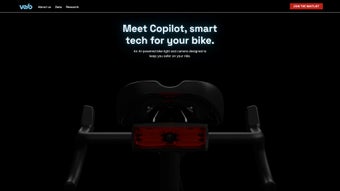
Velo ai introduces Copilot, an innovative AI‑driven web app that acts as a virtual safety co‑pilot for cyclists. In an era where urban traffic density is soaring, cyclists often face the challenge of staying aware of vehicles approaching from behind. Copilot tackles this problem by continuously scanning the rearward road view, leveraging computer‑vision algorithms to differentiate between safe overtaking maneuvers and risky driving behavior. When a potential threat is detected, the system emits an audible alert through a Bluetooth‑connected earpiece or speaker, while simultaneously sending a visual cue to the rider’s smartphone. In addition to real‑time alerts, Copilot projects dynamic light patterns from the bike’s LED accessories, catching drivers’ attention and encouraging safer passing. Each ride is automatically logged, with video snippets and sensor data stored in the cloud for later review. The platform also offers predictive risk scoring, allowing cyclists to understand which routes or traffic conditions present the highest danger. By combining instant warnings, enhanced visibility, and post‑ride analytics, Velo ai empowers cyclists to ride with confidence, turning ordinary commutes into safer journeys.
Key Features of Velo ai Copilot
- AI‑Backed Rear‑View Monitoring: Real‑time video analysis detects approaching vehicles and classifies their behavior.
- Audible Alerts: Customizable tone and volume delivered via Bluetooth earpiece or bike-mounted speaker.
- Smartphone Visual Notifications: Push notifications with distance, speed, and risk level displayed on the Velo ai app.
- Dynamic Light Patterns: Integrated LED strips flash in distinct sequences to signal drivers to keep a safe distance.
- Ride Recording & Cloud Storage: Automatic capture of video and telemetry for each ride, stored securely for later analysis.
- Predictive Risk Estimation: Machine‑learning models assign a risk score to each segment of the route based on historical data.
- Customizable Safety Zones: Users set personal thresholds for distance and speed that trigger alerts.
- Cross‑Platform Web App: Accessible from any modern browser on Windows, macOS, Android, or iOS devices.
- Privacy‑First Architecture: End‑to‑end encryption ensures that video and location data remain private unless the user chooses to share.
- Regular OTA Updates: Continuous improvement of AI models and UI enhancements without manual re‑installation.
These features work together to create a comprehensive safety net. The AI engine runs locally in the browser when possible, reducing latency and ensuring that alerts are delivered instantly, even in low‑connectivity environments. Meanwhile, the cloud component aggregates anonymized data to improve the predictive algorithms for the whole community of cyclists.
Installation, Usage & Compatibility
Step‑by‑Step Installation
- Visit the official Velo ai website and click the Download Copilot button.
- Choose the appropriate package for your operating system (Windows, macOS, Android, iOS).
- For desktop users, run the installer (.exe or .dmg) and follow the on‑screen prompts to create a shortcut.
- Mobile users will be redirected to the App Store or Google Play where they can install the native wrapper.
- After installation, launch the app and grant permissions for camera, microphone, and location services.
- Pair a Bluetooth earpiece or speaker if you prefer audible alerts; otherwise, enable the built‑in speaker option.
- Configure your safety zones and light pattern preferences in the Settings menu.
- Start a ride by pressing the Start Session button; the AI will begin monitoring immediately.
Daily Usage Tips
Once Copilot is running, the interface displays a live rear‑view feed, a risk meter, and the current distance to the nearest vehicle. Riders can toggle between “Silent Mode” (visual alerts only) and “Full Alert” (both audible and visual). The app also offers a “Route History” tab where you can replay rides, view risk heatmaps, and export video clips for insurance or personal review. For best performance, keep the device’s screen active and ensure a stable internet connection for cloud‑based risk updates. If you encounter false positives, adjust the sensitivity slider in Settings; the AI will quickly adapt to your riding style.
Supported Platforms
Velo ai Copilot is built as a progressive web app (PWA) with native wrappers for the most common operating systems:
- Windows 10/11: 64‑bit, requires .NET 5.0 or later.
- macOS 12+ (Monterey and later): Supports both Intel and Apple Silicon.
- Android 8.0+: Requires Google Play Services for push notifications.
- iOS 13+: Runs in Safari or as a home‑screen app with background audio support.
The web version works on any modern browser (Chrome, Edge, Firefox, Safari) that supports WebRTC and WebGL, ensuring a smooth experience even on older laptops or tablets.
Pros, Cons & Frequently Asked Questions
Pros
- Real‑time AI alerts dramatically increase situational awareness.
- Dynamic lighting enhances visibility without relying on external devices.
- Cross‑platform availability makes it accessible to most cyclists.
- Comprehensive ride analytics help users identify risky routes.
- Privacy‑focused architecture protects personal data.
Cons
- Requires a smartphone or dedicated device to run the web app.
- Battery consumption can be noticeable on longer rides.
- Initial setup (pairing Bluetooth, granting permissions) may be confusing for non‑tech‑savvy users.
- Dynamic light patterns need compatible LED hardware on the bike.
- Internet connection is needed for cloud‑based risk scoring.
FAQ
Is Velo ai Copilot free to use?
The core safety features, including AI alerts and dynamic lighting, are available for free. A premium subscription unlocks advanced analytics, extended cloud storage, and priority OTA updates.
Can I use Copilot without a smartphone?
Copilot is a web‑based app, so a device with a web browser (tablet, laptop, or dedicated in‑bike computer) can run it. However, push notifications and some visual alerts are optimized for smartphones.
How does the AI differentiate between safe and unsafe overtaking?
The AI analyzes vehicle speed, distance, lane position, and acceleration patterns. If a car stays within the legal passing distance and slows appropriately, it is marked as safe. Sudden lane changes, high speeds, or failure to yield trigger a warning.
Is my ride data shared with third parties?
No. All video and telemetry are encrypted end‑to‑end. Data is only used to improve the AI models in an anonymized form, unless you explicitly opt‑in to share a clip for community safety reports.
What hardware do I need for the dynamic light feature?
Any LED strip or smart bike light that supports Bluetooth or Wi‑Fi control can be linked to Copilot. The app includes a setup wizard for popular brands such as Light‑Rider, Garmin Varia, and FluxDrive.
Conclusion & Call to Action
Velo ai Copilot stands out as a comprehensive safety assistant that blends cutting‑edge AI with practical cyclist‑focused features. By delivering instant audible and visual alerts, enhancing visibility through dynamic lighting, and providing post‑ride risk analytics, it addresses the most common safety gaps that cyclists encounter daily. While the need for a connected device and occasional battery drain are valid considerations, the trade‑off is a markedly safer riding experience—especially in dense urban traffic. For cyclists who value situational awareness and want a data‑driven approach to route planning, Copilot is a worthwhile addition to any bike kit.
Ready to ride smarter? Download Velo ai Copilot now and enjoy the peace of mind that comes with an AI‑powered safety companion. Whether you’re commuting, training, or exploring new trails, let Copilot watch the road behind you so you can focus on the journey ahead.
Pros: Real‑time AI alerts, dynamic lighting, cross‑platform support, detailed analytics.
Cons: Requires device connectivity, battery usage, initial setup complexity.
Guides & Tutorials for Velo ai
How to install Velo ai
- Click the Preview / Download button above.
- Once redirected, accept the terms and click Install.
- Wait for the Velo ai download to finish on your device.
How to use Velo ai
This software is primarily used for its core features described above. Open the app after installation to explore its capabilities.
User Reviews for Velo ai 0
No reviews found




